Plans for RetroX v3: Theme support

Lately I’ve been thinking a lot about why other frontends are so popular while they are only “front-ends”. Don’t take me wrong, I know that they have a lot of work behind, but I honestly think that RetroX is way ahead of most Android frontends in terms of ease of use and features. Only that it seems that this is not enough.

Watching videos in YouTube I find a lot of reviews of RetroPie / Emulation Station and some reviews of other frontends for Android presented as “the best”. Sometimes I write to the authors of those videos and they have never heard of RetroX before.

I have come to the conclusion that a lot of people is attracted by visuals, and I remember the old days of Linux when a lot of people wanted to install it just to have “The 3D cube”. So their rationale is to be attracted first and then try to figure out how to make it work, and probably it doesn’t matter how hard it could be, they just want to have what they saw. (It happened a lot with Linux circa 2004). The approach of RetroX has been the oposite, give the best technology to make the process easier, but if people is not attracted first, they will never get to that point.

Personally I prefer a clean view, soft colors, smooth fonts, but that’s me! Other people clearly prefer more “joyful” views. I’ve received some comments about this from several people (Allan McdonaldLee Conduit and others) but I was too focused in other priorities that I didn’t worry much about it. I should add that one of my reasons to say “no” is that I thought I would spend a lot of time finding the appropiate colors, icons, background etc. Time that I prefer to focus on new features.

But now I opened my mind about it.

I will add a new “view/layout” to RetroX to make it themeable by anyone. This will allow other people to use their own skills and tastes to create their own realization of how RetroX should look. I’ll keep the current modes and will add a new “themeable” mode. From what I’ve seen in EmulationStation with a few elements people can create really beautiful themes, so I think that this will take RetroX to new unexplored grounds.

Why not before? May be I wasn’t aware of how communities can add their own views of what is best. Yes, I’m a bit of a dictator in RetroX but this new theme system will compensate my lack of graphical skills. I can provide the foundations and anyone interested will be able to build over it, something that was brought back to my mind after opening the source code of the RetroX libraries.


The above post was published in the RetroManiaUK group on Facebook, on Aprils 1st, but it is not an April fools joke.  A few days ago I started to work on this feature, and it is looking good!
Release 2.6.6 – Sega Dreamcast

Finally Sega Dreamcast has arrived to RetroX!! This is one of the most requested system and we put it at the top of the list in our 2017 roadmap, so a lot of people were waiting for it.

I will divide this post on two aspects of this release: Users and Developers.

Users

Consider this an initial release. I left some parts to later updates because they required more days and I prefer to release as soon as I can.

The following will be added in future releases:

  • Multidisc support
  • VMU swap support
  • Settings – Full screen support
  • Settings – Region support (US, Japan, etc)
  • Settings – Performance options (frame skipping, specific fixes/optimizations)
  • BIOS boot
  • Get rid of the required clock set up

Most of these are options available in the original emulator, but not exposed in this port.

Note that this emulator doesn’t support save states, only saving progress through the original Dreamcast VMU “memory cards”. As you may expect, those saves are stored with your RetroX account in our cloud.

For developers

Honestly I was a bit reluctant to work on this system, because it is always a challenge to port a complete new emulator to RetroX. There is always a little detail that require several iterations and testing, all emulator are written different! Although this was not the exception, I didn’t think it would take the few time that it took to make the port (scattered hours among three days). Sometimes this kind of work can take at least one week.

The code base which is the Reicast emulator is very clean and fortunately most changes could be done only in the Java part. Also, the fact that this emulator doesn’t support saving states reduced the complexity of the port a lot.

This port was made in this new era of RetroX where the code is committed in public, so anyone interested can follow the track of how the changes were made. If anybody is interested in porting a new emulator, this will be an excellent example case.

The problem that took most of the time was something that didn’t happen before.  Once the options menu was displayed, the GL surface went blank.  I had to do several tests to know exactly what was the problem, and my conclusion is that for some reason, part of the GL surface was altered in a way that it was not visible anymore. Finally I came to a workaround, which is to add the view and remove it after use (not hide/gone it), this forced to GL surface to reset completely.  The code ended to be more dirty but it worked.

In comparison, the Mupen64 emulator also used a GL surface but it doesn’t have this problem. Looking at the root cause would require a lot of iterations, so I just went with the workaround.

Finally, here is the video I recorded the day before the release. Some people have asked me about the music that I was listening to – which is awesome – it is the backing track of the song Impossible Things by Nick Johnston. This guy is an incredible musician and guitar player, I totally recommend you to check his work, he have published his albums in YouTube and you can support him by buying the physical media, his transcriptions and backing tracks, which I happily did of course!

RetroX open source emulators and libs now on github

RetroX is not an emulator in itself, but a front end for existing emulators.  There are many front ends for emulators but what makes RetroX different is that the emulators have been modified to meet “the RetroX standard” like having support for custom controls, Android TV devices, RetroX save/load progress and more.

These modifications are possible because these emulators are released with open source compatible licenses, so they grant rights to modify the code and distribute the derivate products under certain conditions. One of these conditions is giving the source code back and we have been doing it since the commercial release en 2015.

But we could do it better.

Since today, the code will be available through their own repositories in github, and thanks to git subversion support the whole change history has been kept, so anyone interested will be able to see what changes we did to each emulator.

RetroX compatible emulator

We didn’t make this step before due to our lack of git abilities, but since I started to use git and github everyday the move just seemed natural.  Sure we would like to do more about it, like helping integrate some fixes to the upstream projects but, we are going step by step on this as the time allows.

For such a job to be possible we should have tracked the source code as clones of the original repositories from the beginning, but as we didn’t use git until now that track is lost… Unless someone gives advice about how to create that link.  At least, the work on new emulators will have this track.

RetroX libraries are now open source

As per license requirements, all the code that is linked to the emulators has been made open source as well. So we are proud to announce that the RetroX libraries that help make an emulator to be RetroX compliant now has been released as LGPL 2.1. on github.

Want to help?

Now that this code is shared with the proper tools, we see that new opportunities arise:

  • People will be able to add their favorite emulators to RetroX (more details below)
  • People requesting fixes to existing emulators will be able to take a look and give some help directly from the source code
  • Bugs or missing features on the upstream emulators now can be extracted from our changes, with a bit of effort but doable.

Adding new emulators

We encouraged ourselves to do this step also to give other people the possibility of adding emulators that we don’t have planned to add in the near term. Some time ago we published our roadmap for 2017 and we found that it was very limiting that some people have to wait until next year to see their emulators being added to RetroX.

We will work on the emulators in that list but now other people will be able to work on emulators that are NOT in that list. Here we are thinking of emulators for machines like the BBC Micro, Amstrad CPC, FX98, X68000 and more.

Don’t worry that we haven’t gave up on those machines, only we are saying that if someone wants to do it now, they can.  If not, we will bring them in as soon as we can.

For those who want to work on that, we will give them all the required support. We already open sourced the RetroX libraries required to make a RetroX compliant emulator, but we are sure that more than that will be required.  We cannot promise nothing today but our ideal is to create a tutorial of how to modify an emulator to make it RetroX compliant. We will announce it as soon as it is available.

As a side note: From time to time people that have not used RetroX think that it is a simple wrapper for RetroArch, now you can check the changes that we have made to RetroArch to work as a RetroX compliant emulator. They are not huge but in no case they are small either.

Release 2.6.5 – Golden Eye – Better controls for N64

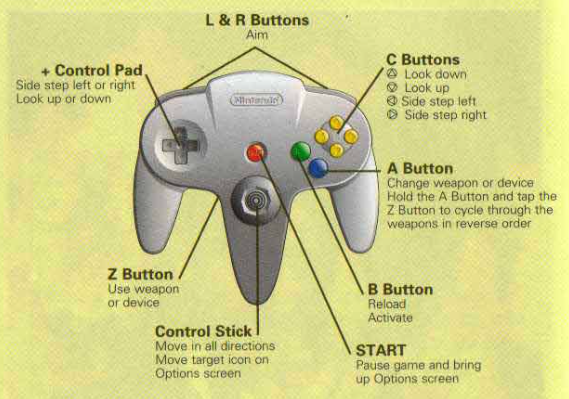
One of our targets has been make things as simple as possible, this included making the gamepad configurations less painful providing a centralized mechanism: Set up your controller once and for all. But sometimes underlying details makes it hard to apply one rule for all, and that’s the case of the N64 controller (read The law of leaky abstractions for background theory).

The RetroX fronted as well as emulators like RetroArch uses the SNES style controller as a basis for all systems, and a special derivate which is the PlayStation one, which simply add more buttons.  Most systems have just subsets of these two controllers, except for N64 where the controller is a completely different beast, a curious design to say the least.

To play N64 without issues you need an N64 controller, everything else will be a hit and miss.  Most emulators will request the users to map each button of their controllers but we wanted to stay away from that providing a standard configuration for SNES style controllers. As me (the developer) had almost zero experience with N64 beyond the intro of Super Mario 64, this simplification failed with other games, being Golden Eye 007 the icon if this problem.

Until now.

I changed the way that SNES style controllers are mapped adding the use of the right analog stick as “C dpad” buttons – the yellow ones in the N64 controller. Using this configuration, the directional nature of the C buttons is kept and they remain as natural as possible for the intentions of the game designer.

Given that the signals that right analog controls emit are not standard among all controllers, I added two new configuration points for the right analog control, just select them and follow the instructions so RetroX can learn about the codes used with your gamepad. You will see those new points in blue.

New analog right setup

But this was not enough.

Testing Golden Eye and having some experience with modern day first person shooters, it felt more natural to invert the analog controllers, so you can strafe with the left analog and move with the right analog. Now there is a new option to invert the analog controllers from the in-game options, or make it the default for your game in the game details screen -> “configure this game” option.

GoldenEye original controls

And this was not enough again.

The controls still seemed awkward by design, because the strafe left/right is combined with the look up / down while modern FPS games combine strafe with move forward / backwards.  So finally I added a new option called “Optimized for Golden Eye” where not only the analog controllers work as intended, but also the trigger to shut the guns has been switched to the right (R2) and the aim is at the left (L2).

I played Golden Eye some minutes with this new configuration and it is a world of difference.

These new settings made the old Digital / Analog modes on N64 become obsolete, so now with the SELECT button you can easily switch between Original, Inverted and Golden Eye modes.

Users of 8bitdo N64 controllers

I also added an experimental setting for users of the 8bitdo N64 controllers. As they are physically N64 controllers, I added an option to automatically map that controller when used in N64 games. As I don’t have that controller (yet), this setting is disabled by default and users must enable it in the Gamepad Options.

I expect to receive good or bad feedback about this, considering it that it was done in the blind!

Also I would like to give big thanks to the members of the RetroManiaUK Facebook group for giving me these ideas to improve the way RetroX works with N64 controllers.

Also in this release…

There are also some fixes included in this release:

  • Not available games now are removed / cleaned as expected
  • Games based on CUE files now are downloaded correctly from networked storages (NAS / Cloud). These are used by CD based systems like Playstation, PC Engine CD and Sega CD.
  • Final Burn Alpha addon now is compatible with games requiring samples.  (Provided samples may be not right with some games as I found with Donkey Kong, so if you have a games with samples but no sound please send me a message)
  • Save states related options have been removed from MAME 2001, 2010 and 2014. Only 2003 supports saving states
  • Size measure of installed games coming from compressed files has been fixed.

That’s all for now and and always, just enjoy!

When will my favorite emulator be added to RetroX?

This is such a frequently received question, that we felt it deserved a dedicated response.

Regular launchers only need to send the ROM file to the emulator, nothing else. In this sense, adding emulators would be a simple enough process. However, RetroX is a truly unique “frontend”, that can do so much more.

Often front ends will just use RetroArch to support a range of platforms, but this doesn’t include those that use a keyboard, mouse or a joystick. These systems just do not work on RetroArch (Android). In fact many of the systems found within RetroX aren’t even supported by RetroArch (Amiga, MS-DOS, Atari computers, etc).

RetroX on the other hand can (and does) make desktop based games run as if they were on a console. There are still several improvements that can be made to RetroX to improve the experience for the user, but rest assured – we will. However the point I’m making is that we can!

2016-05-20 15.36.50
Save / Load states in the Cloud

Adding a new emulator to RetroX is not as easy as you may think. It’s not just a case of directing the ROM to the emulator. You also need to integrate each emulator (with all their own unique quirks) into the unique features of RetroX.

This requires us to take the original emulators source code and making the distinctive modifications required to be compatible. Be that Universal Controller Setups, Android TV compatibility or the most complicated of all, cloud based save states (and memory cards) which use the standard RetroX interface. This last point often requires additional code to be added for image processing to incorporate screenshots into our unique multi-slot save feature, all of which must be coded from scratch.

Adapting systems already within the RetroArch platform is a fairly simple process.  However, many of the emulators integrated within RetroX are standalones, all of which again require coding from scratch (including the most challenging of all – desktop based platforms).

But we love computer games!

RetroX compatible emulator

As our developer resources are scarce (mostly me, Franco), we have to set priorities in the way new features and new emulators are added to RetroX. Sometimes there are small fixes or features that may only take a few hours, but others can require weeks or even months of work. Recent examples being the ability to add games from network based storages (cloud, NAS), or the code for cloud based save states which required changes to be applied and tested to each of the supported emulators.

To help improve the regularity of new features and improvements I made the decision several weeks ago, to adapt my working style to allow me to simultaneously work on both long term and short term features (who says men can’t multi-task). However, what has become apparent is that whatever approach we take, there will always be bottle necks.

So, in an effort to reduce your levels of anxiety, I can declare which emulators we want to include within RetroX in 2017, and in which order.

I hope that this will help to reduce the amount of questions that I receive (and answer) on this subject.

Here is the list:

  • Sega Dreamcast
  • 3DO
  • Commodore C64
  • Sega Saturn
  • ZX Spectrum
  • GameCube
  • Atari ST
  • Amiga CD32

In the meantime, we will continue adding new features to RetroX, with plans already in place to improve functionality in several of the existing emulators we support. Including:

And of course, non-emulator related features like offline support, or better ways to handle multiple versions of the same game etc.

As always, if you have any ideas for new features, then please contact us via our Facebook group or send us a message on Twitter.

We are always listening.

New FileX Manager

device-2017-02-26-222804
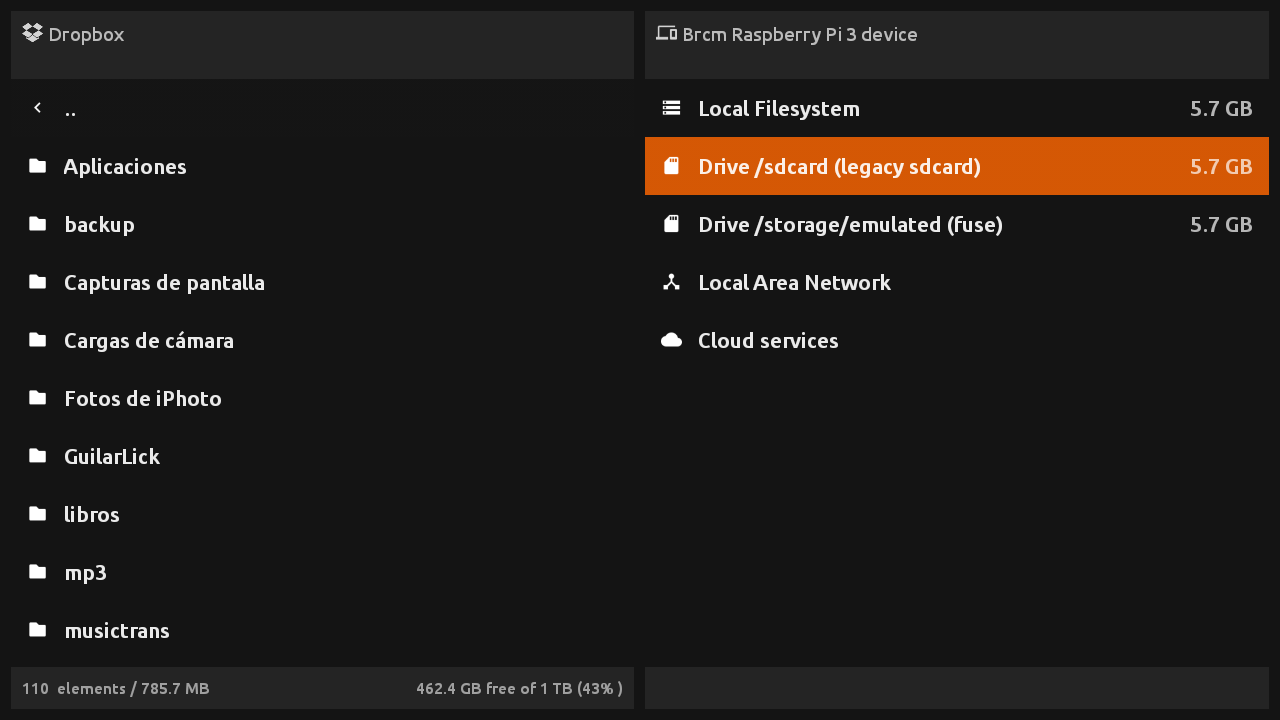
Since today a new application for Android TV devices has been released: FileX Manager.  As the name suggest, this app will help you manage your files on Android TV devices like the NVIDIA Shield TV, Amazon Fire TV, Amazon FireStick, Xiaomi Mi Box and even generic chinese TV Boxes.

This app has been designed to work **without the need of a pointer **, you can perform all operations with the D-Pad in your remote.

Note that this is an early release, but why wait for the advanced features if you can start using it today. And YES, as you may be guessing, it has been put into Frambu 1.1, so you can copy or sideload anything to your Raspberry Pi based RetroX setup from now on.

The current version is FREE for all the RetroX users. No trial, no ads, just you and your files.

This is a standalone application with more advanced features than the same file browser that you find embedded in RetroX, that’s not a surprise because both use the same codebase.

With FileX you can:

  • Manage your local files
  • Manage your files stored in Google Drive, DropBox, One Drive and Box cloud services
  • Manage your files stored in your NAS or shared in a Windows Network (SMB/CIFS)
  • Open compressed files as if they were simple folders (zip, 7z and rar files are supported)

More info at FileX Manager official page.

Release 2.6.2: MAME and FBA ROM handling improvements

New RetroX release. Codename: A-MAME.

Many users – including me – suffered when trying to play MAME or FBA games without using a full ROM set. This was because these games can be splitted into several files: One main .zip file plus several small files containing just the differences for region specific versions, bootlegs, etc. Without the info at hand, it’s very easy to miss some files and in that case the emulator just crashed.

Until now.

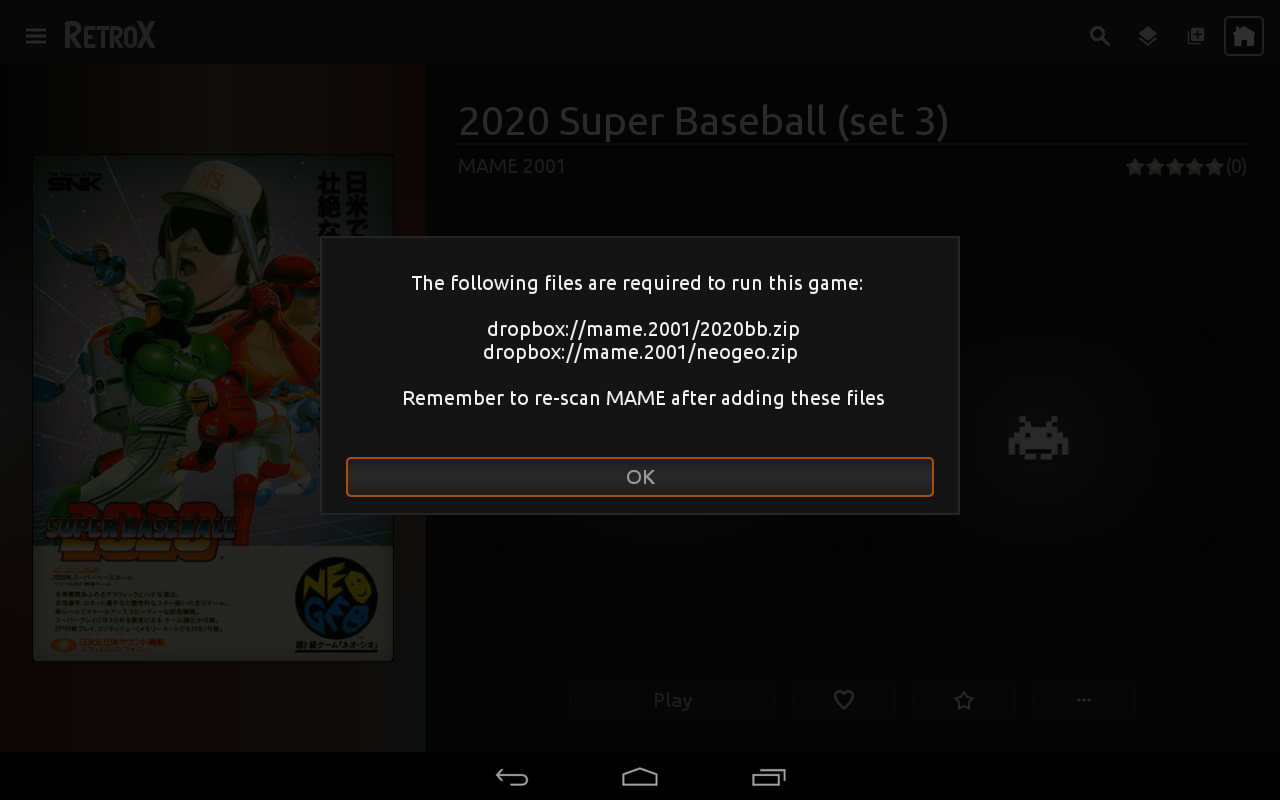
With this release the user will be able to know which files are missing and where they should be made available.

This feature was NOT planned, I was fixing a different problem and that required this kind of knowledge to be integrated in the app. If the ROM file was stored in a NAS or cloud, only that file was retrieved and not all the needed ones, so many many games just crashed. If you had MAME/FBA games in a network storage and the emulator crashed, this was the reason.

And… that fix wasn’t planned as well! I was fixing a bug that may have been crashing some emulators: If a large file download or transfer failed or was cancelled by the user, the file was kept and RX would never try to download it again, crashing the emulator when used.

And… that fix was because I wanted fix the problem that not all network operations were showing the progress info, neither can be cancelled…

I just wanted to test my new Xiaomi MiBoxTV!

device-2017-02-20-183351
RetroX asking for missing MAME files

Cloud based save states

RetroBoxTV “God save the states” release is finally out!

This is the first update that brings some features ONLY for Activated Accounts (AA). This is because the new features will increase the load in our servers, and some features don’t make sense to free users anyway because they see only a few games.

The main feature (AA only) is of course, cloud based save states and memory cards. This basically means that you can play a game in one device and continue playing in another device. The save states and memory cards are now tied to your user account, it doesn’t matter what device you are using.

At the beginning, if you already have more than one device, the first one will upload all its save states and memory cards, the following devices will only upload the files that are not in the cloud to prevent overwriting, and it will only download the files that are not in the current device, again to prevent overwriting. Once you get all your devices running, the new saves will turn into the official ones for your account.

2016-05-20 15.36.50
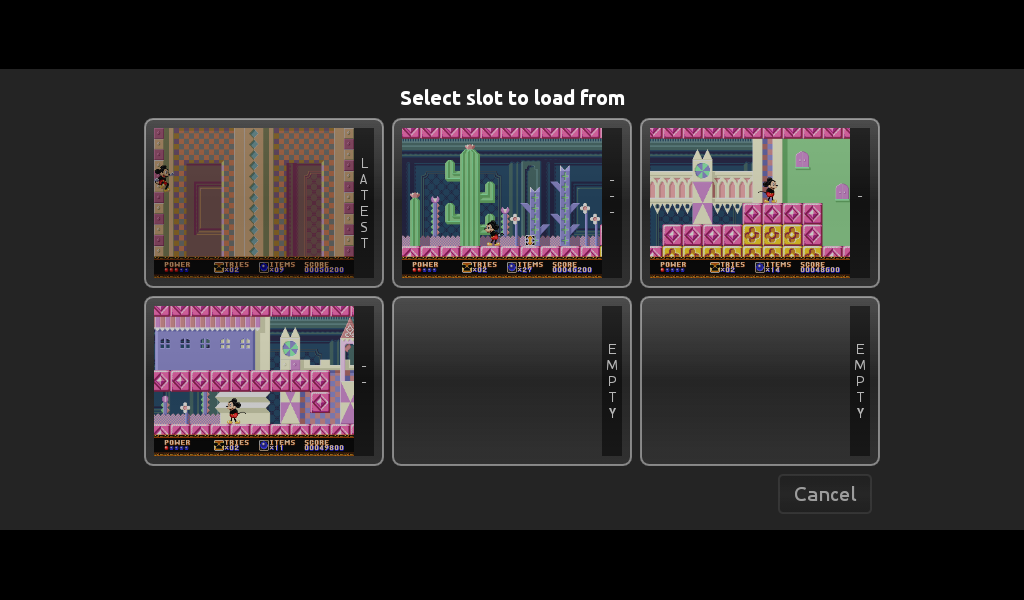
New Save States user interface

With this new feature, the current user interface for save/load states and slot selection was not cutting it. There was no way to distinguish between current and previous save states so I made a complete change on how the emulators handle that part. As you can see in the screenshots attached, now all save states are shown with a screenshot of the moment they were created, that will help you to recognize easily what slot has what state. The only emulator where I couldn’t get screenshots was the N64 emulator, for now it will only show the N64 logo, but I hope to revisit that code in the future.

The cloud based save states will be free to all AA for now, but if this feature turns to be an storage issue in the future, we may have to bring a way to fund it, but don’t worry, we thought that the worst case would be a small yearly subscription fee.

Another new feature is the Playstation multidisc support. Just put all the files in one folder and RetroBoxTV will offer a “change disk” option.

The “last played” game list was stored in the device, now it has been moved to the user account. That will help multi-device users find their latest played games anywhere.

For AA accounts using TV devices I added some new lists to the front page, this lists will help you find games that other people consider that are worth playing. The new lists are: Trending this week, Most popular and Most favorited. We show each game in one list only, so you will get up to 75 recomemndations from those lists.

And the last one. To stop ES Explorer causing issues with RetroBoxTV, there will be a warning message if RetroBoxTV detects that you left ES Explorer running.